Content creation can mean recording at home, making videos on location, editing at a desk, or moving files between devices. A useful gift can make one of those regular steps easier.
These 11 ideas range from audio and workspace gear to photo printing, charging, and media transfer. Check compatibility and dimensions before choosing anything that needs to fit an existing setup.
11 Gift Ideas for Content Creators
MAONO Wave T5 Mini Wireless Lavalier Microphone

- Four one-tap voice filters offer quick tone choices for recordings.
- The transmitter lasts up to nine hours, with 40 hours of total use from the charging case.
- A Type-C port on the receiver supports phone charging while connected.
Best Gift For: A video creator, interviewer, or podcaster who records away from a desk.

FIFINE T669 USB Condenser Microphone Kit

- The USB connection plugs into a PC or laptop without extra hardware or drivers.
- The kit includes a boom arm stand and shock mount for positioning the microphone.
- A double pop filter helps minimize popping sounds in recordings.
Best Gift For: A podcaster or voiceover creator building a home recording setup.
HP Sprocket Select Instant Photo Printer

- Prints photos from an iOS or Android device onto sticky-backed paper.
- The HP app offers editing tools, frames, and filters for personalizing photos.
- Its pocket-sized design is rechargeable and intended to travel easily.
Best Gift For: A creator who likes turning phone photos into shareable prints or custom stickers.
HUANUO FlowLift Dual Monitor Stand

- Each arm supports screens from 13 to 32 inches and 4.4 to 19.8 lbs.
- The full-motion mount offers tilt, swivel, and rotation adjustments.
- Built-in cable management keeps cords out of sight and out of the way along the arms.
Best Gift For: A creator with two compatible screens who wants more desk space for editing work.
JLab Go Air Pop True Wireless Earbuds
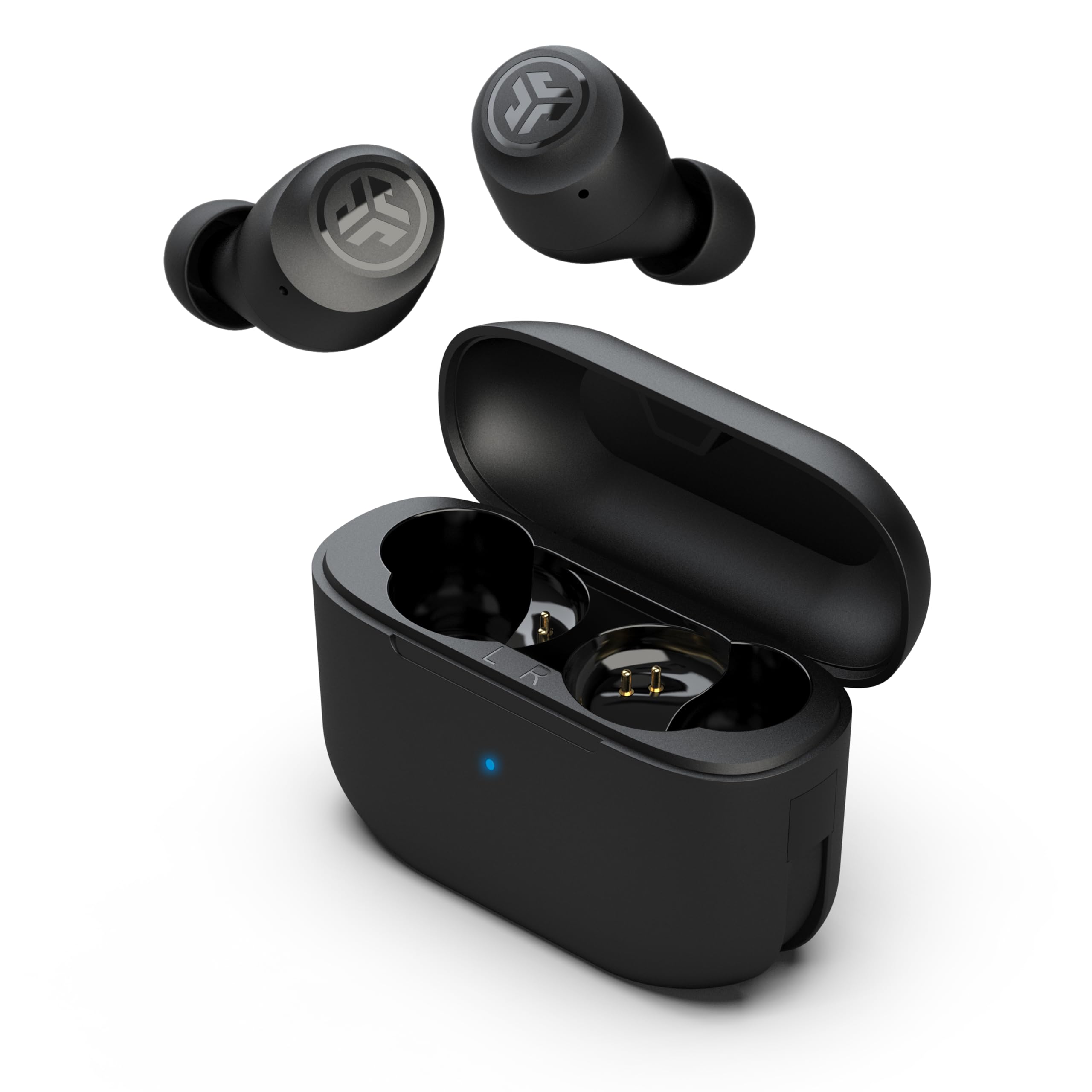
- Either the left or right earbud can be used independently.
- Three EQ settings let the listener switch between signature, balanced, and bass boost sound.
- Each earbud has a microphone for calls.
Best Gift For: A creator who listens to audio or takes calls while working away from the desk.
TP-Link Archer AXE75 Tri-Band WiFi 6E Router

- Tri-band WiFi 6E supports simultaneous use across three bands.
- The router includes a 6 GHz band for more bandwidth.
- It supports OneMesh when connected to a TP-Link OneMesh Extender.
Best Gift For: A creator whose home workspace connects several devices for streaming, calls, and uploads.
Audioengine A2+ Wireless Computer Speakers

- The speakers are designed for nearfield listening on a desk.
- A built-in DAC connects directly to a computer through USB-C.
- Audio can stream wirelessly or connect through USB-C, RCA, or 3.5mm AUX inputs.
Best Gift For: A creator who wants desktop speakers for listening to edits, podcasts, and music.
Nulaxy Pull-Out Height Adjustable Laptop Stand

- The stand fits laptops from 10 to 17 inches.
- Its screen height adjusts from 1.2 to 20 inches.
- The stand folds for storage and portability.
Best Gift For: A laptop-based creator who switches between sitting and standing at a desk.
LISEN Ultra Slim MagSafe Power Bank
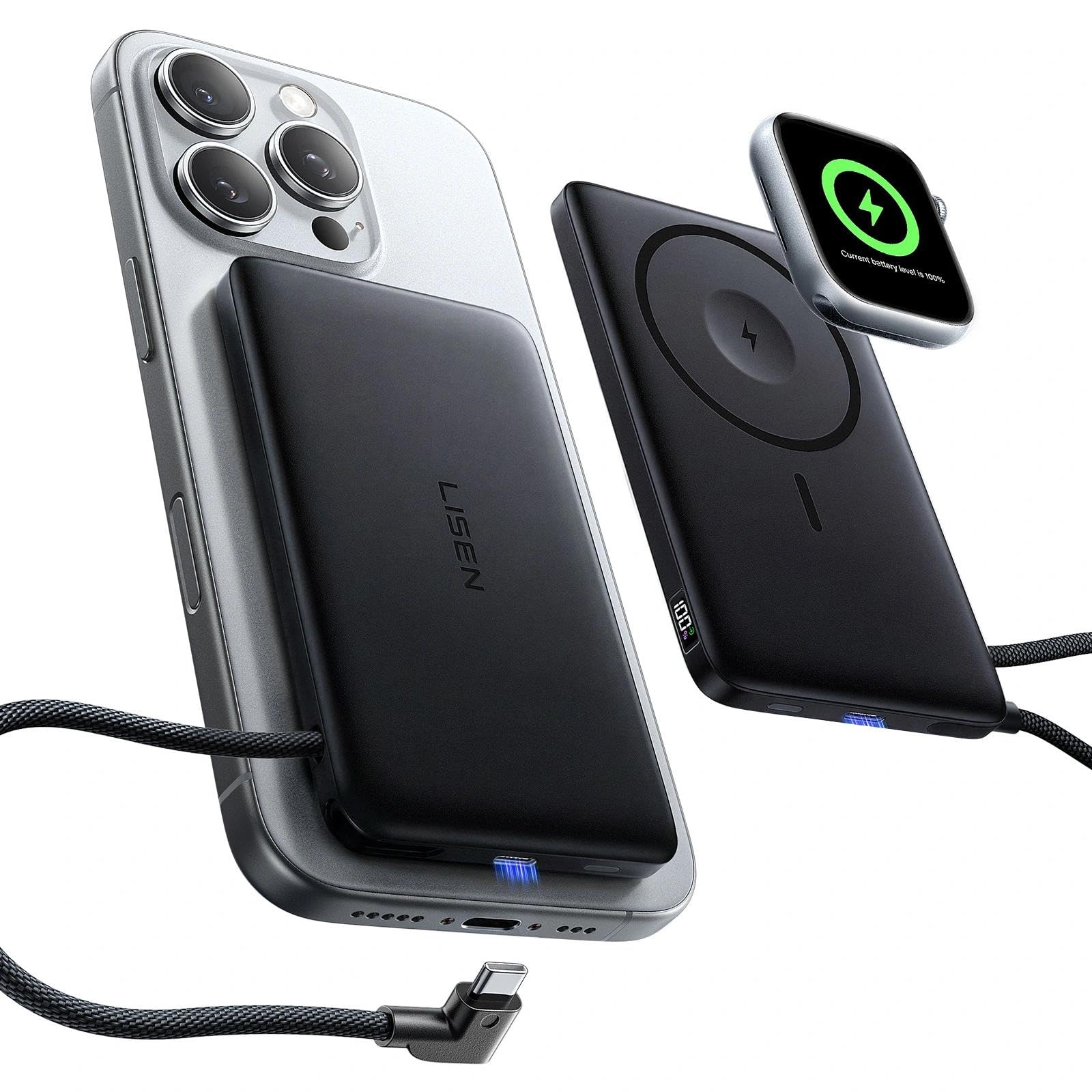
- It supports MagSafe charging and Apple Watch charging.
- The built-in USB-C cable supports 20W fast charging.
- A digital display shows remaining power and charging status.
Best Gift For: A mobile creator who wants a portable charging option for a compatible phone or watch.
SABRENT USB-C Hub & M.2 SSD Dock

- The dock has three USB Type-A ports for peripherals.
- Its HDMI port supports an external display up to 4K@60Hz on a compatible device.
- The internal M.2 slot supports an M.2 SATA or NVMe SSD.
Best Gift For: A laptop creator who needs to connect peripherals, an external display, or extra storage.
SABRENT 75-in-1 Multi Flash Media Card Reader
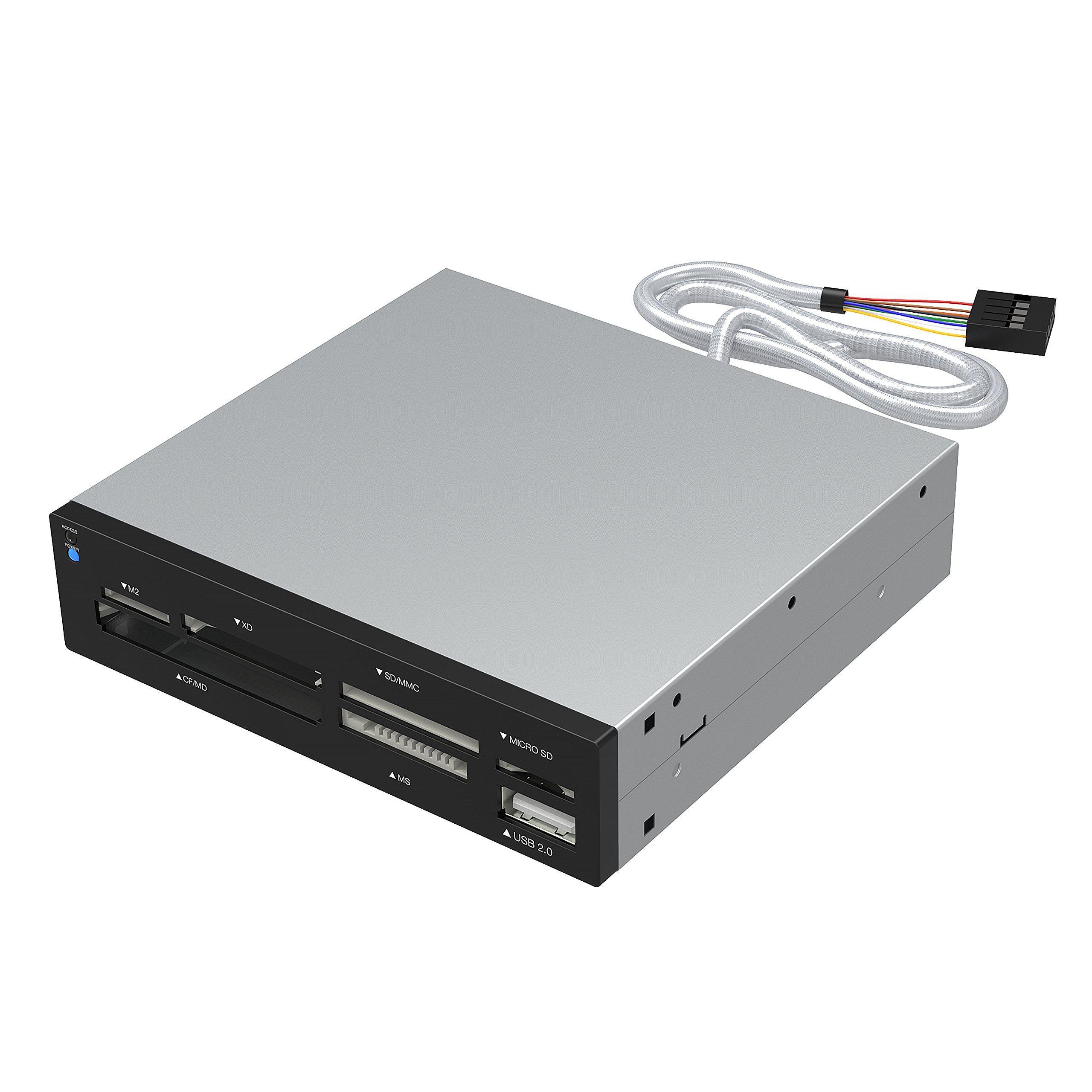
- The reader supports 74 different types of memory cards.
- It includes six card-reader slots for multiple flash-media types.
- A USB 2.0 port adds a place to connect an external USB device.
Best Gift For: A creator who transfers photos or other files from memory cards to a computer.
Choosing gifts for content creators by workflow
Start by thinking about what the recipient makes and where they work. Someone who records interviews or videos on location may appreciate audio equipment that travels with them, while a podcaster who stays at a desk may get more use from a microphone kit with an adjustable arm.
For gifts for content creators, match the gift to a regular part of the creative routine.
Consider the devices they already use before choosing anything that connects to a phone, computer, monitor, or camera. A quick check of ports, operating system, monitor mounting pattern, screen size, and desk setup can prevent a thoughtful present from becoming a compatibility project.
If you are unsure, a compact accessory with broad use may be easier to fit into an established workspace.
Think about whether the recipient works alone or with other people. A solo video maker may value easier voice recording, while someone who edits with several screens may prefer a tidier desk.
A gift that supports a task they already do is usually more personal than equipment for a new hobby they have not mentioned.
Balance budget, usefulness, and setup
Set a comfortable budget before comparing options. Smaller accessories can make a practical gesture, while equipment that changes a desk or recording setup may call for a larger spend.
For gifts for content creators, think about how often the person would use the item, whether it replaces a workaround, and whether it needs other gear to work well.
A lower-cost item can be especially thoughtful when it solves a recurring annoyance, such as moving files or keeping a laptop setup flexible. For a larger purchase, weigh the usefulness of the main feature against the amount of setup it requires.
Check actual prices and current product details before buying, since they can change.
Account for any extras the recipient may need, such as compatible cables, storage, or a matching device. A hub or stand only helps when it fits the computer and workspace; audio gear only earns its place if it suits the way they record.
If a gift depends on a separate purchase, include that in your decision and budget.
Personalize the gift and presentation
Personalization can come from noticing the details of someone’s creative process. A person who shares finished photos may enjoy a way to print or display selected images, while a creator who spends long sessions at a desk may appreciate an accessory that gives their workspace more flexibility.
For gifts for content creators, a short note explaining why you chose it can make a practical item feel considered.
You can also make the presentation useful. Pair a desk accessory with a handwritten note about the project they are working on, or give a media-transfer tool alongside a card offering to help organize a shoot archive.
Keep add-ons relevant to their actual workflow, rather than assuming they want supplies for an unrelated creative pursuit.
When possible, discreetly confirm what they already own and how they prefer to work. A duplicate accessory can still be useful, but matching their existing devices and habits raises the odds that it will be used.
If you cannot ask directly, choose something easy to understand and simple to incorporate.
Shop thoughtfully for the workspace
Workspace gifts need a little practical checking. A monitor mount depends on the screens and desk, and a laptop stand has to suit the laptop and the way its owner works.
Ask about measurements or check available setup details when you can; dimensions and mounting requirements matter more than a polished product photo.
For connected accessories, verify the devices and ports involved before ordering. Phone charging depends on a compatible phone and case, while a hub’s display features depend on the computer.
A quick check can save the recipient from troubleshooting and help them enjoy the gift sooner.
For audio gifts, consider the recording environment and the recipient’s existing workflow. Someone recording voiceovers may need a desk microphone, while a creator who works on location may prefer a portable setup.
Check current compatibility and included components so the present fits the tools they already use.
Last-minute advice for gifts for content creators
When time is short, choose a gift whose use is clear and whose setup is familiar to the recipient. Accessories that work with devices they already use are often simpler to integrate than a major equipment change.
Read current compatibility information and confirm the item matches their computer, phone, or workspace before placing the order.
Check delivery estimates at checkout rather than relying on a general promise, especially if the gift is tied to a date. If arrival timing is uncertain, you can still make the present feel complete with a printed card describing the item and why you chose it, then give the physical gift when it arrives.
Keep a backup plan that preserves the thought behind your choice. If a specific accessory is unavailable or does not match their setup, look for another option serving the same regular task, such as recording, editing, organizing, or transferring media.
Confirm the substitute’s details and delivery estimate before committing.